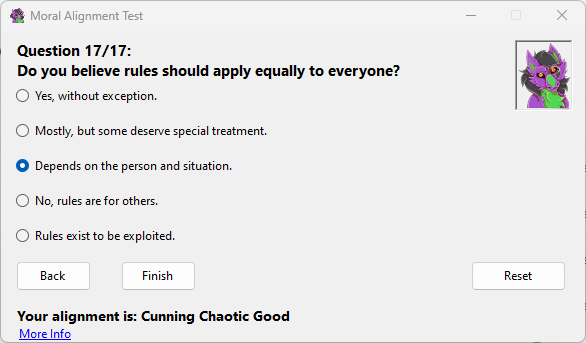
Moral Alignment Test Application is a Windows Forms desktop application written in C# for .NET 8. It presents a set of moral and practical decision questions, scores the answers across alignment axes, and returns a result based on the site's expanded alignment system.
The application is linked to the Moral Alignment Portal, where the individual alignment pages are explained in more detail.
Overview
The application adapts the familiar role-playing alignment format into a simple questionnaire. It uses the classic moral axis of Good, Neutral and Evil, the ethical axis of Lawful, Neutral and Chaotic, and an additional custom trait prefix.
The result can therefore be a standard alignment such as Lawful Good, or an expanded result such as Cunning Chaotic Good or Compassionate Lawful Neutral.
Features
- Seventeen questions, each with five possible answers.
- Back and forward navigation so users can change earlier answers before submitting.
- A reset option for starting again.
- Scoring for the moral axis, ethical axis and custom trait prefix.
- A final result label showing the calculated alignment.
- A downloadable Windows executable.
Alignment Axes
The moral axis measures Good, Neutral and Evil tendencies. Positive scoring increases the Good side, negative scoring increases the Evil side, and balanced scoring produces Neutral.
The ethical axis measures Lawful, Neutral and Chaotic tendencies. Positive scoring increases the Lawful side, negative scoring increases the Chaotic side, and balanced scoring produces Neutral.
The custom trait system adds one of five prefixes:
- Steadfast
- Selective
- Cunning
- Compassionate
- Ruthless
The highest-scoring trait becomes the prefix of the final result. If no custom trait is dominant, the result can be shown without a prefix.
How It Works
Each question stores five answer options. Each option can adjust one or more score values. The application keeps track of the selected answer for every question, allowing the user to move backwards and revise choices.
When the user submits the test, the application totals the moral, ethical and trait scores. It then chooses the dominant moral result, dominant ethical result and strongest custom trait.
Development
The application is built with Windows Forms on .NET 8. Windows Forms provides the desktop user-interface framework, while C# provides the application logic.
The core structure is based around a question model that stores:
- the question text
- answer labels
- moral-axis scoring
- ethical-axis scoring
- custom-trait scoring
The interface uses radio buttons for answer selection, navigation buttons for movement through the test, and a result label for the final output.
Usage
- Launch the application.
- Read the current question.
- Select the answer that best matches the user's view or instinct.
- Use the back button to revise earlier answers if needed.
- Submit after all seventeen questions are answered.
- Read the alignment result.
- Use reset to start again.
Example Questions
One example question asks what the user would do after finding a wallet full of money in the street. The answer choices distinguish between returning it, keeping it, donating it or acting according to personal benefit.
Another example asks how the user views rules. The answers range from strict respect for rules to treating rules as obstacles or tools.
Download
The application can be downloaded from:
See Also
References
Discussion log
Use comments for sourcing notes, corrections, and disputed details.
No comments yet.